Product Newsletters
Monthly or bi-weekly digests that keep your users informed about what you shipped and why it matters to them.
Scroll to see more
Scroll to see more
Changelog Pages
Technical, scannable entries that let developers quickly understand what changed and whether it affects their setup.
Scroll to see more
Scroll to see more
LinkedIn Posts
Narrative-driven posts that translate feature launches into stories decision-makers actually engage with.

Deco
77,350 followers
Now•
Every enterprise AI deployment hits the same tension: move fast enough to be useful, stay governed enough to be safe.
Binary approve/deny on every tool call doesn't scale when your agents interact with dozens of systems. But auto-approving everything isn't an option when tools can write to Jira, Snowflake, or your CRM.
We just shipped graduated tool approval controls in deco:
• Always ask — every tool call requires explicit approval
• Skip read-only — read operations auto-approve, writes still need sign-off
• Auto-approve all — full autonomy when speed matters most
Teams can shift between modes during a session. An SRE triaging an incident can switch to auto-approve for speed, then dial back to always-ask once things stabilize. A finance team running read-only queries against Snowflake can skip approvals on those while still requiring sign-off on write actions like vendor requests.
We also added per-tool latency tracking, token and cost stats, and a live generation timer directly in the chat UI, giving platform teams the data they need to evaluate tool reliability and cost before scaling org-wide.
Stale and cancelled approvals now render with distinct visual states, so the audit trail is clear at a glance.
If you're building an internal AI platform and need to give teams autonomy without losing governance, this is the kind of granularity that matters. See it in action: [link]
88 reactions
4 comments•1 repost

Tiptap
77,350 followers
Now•
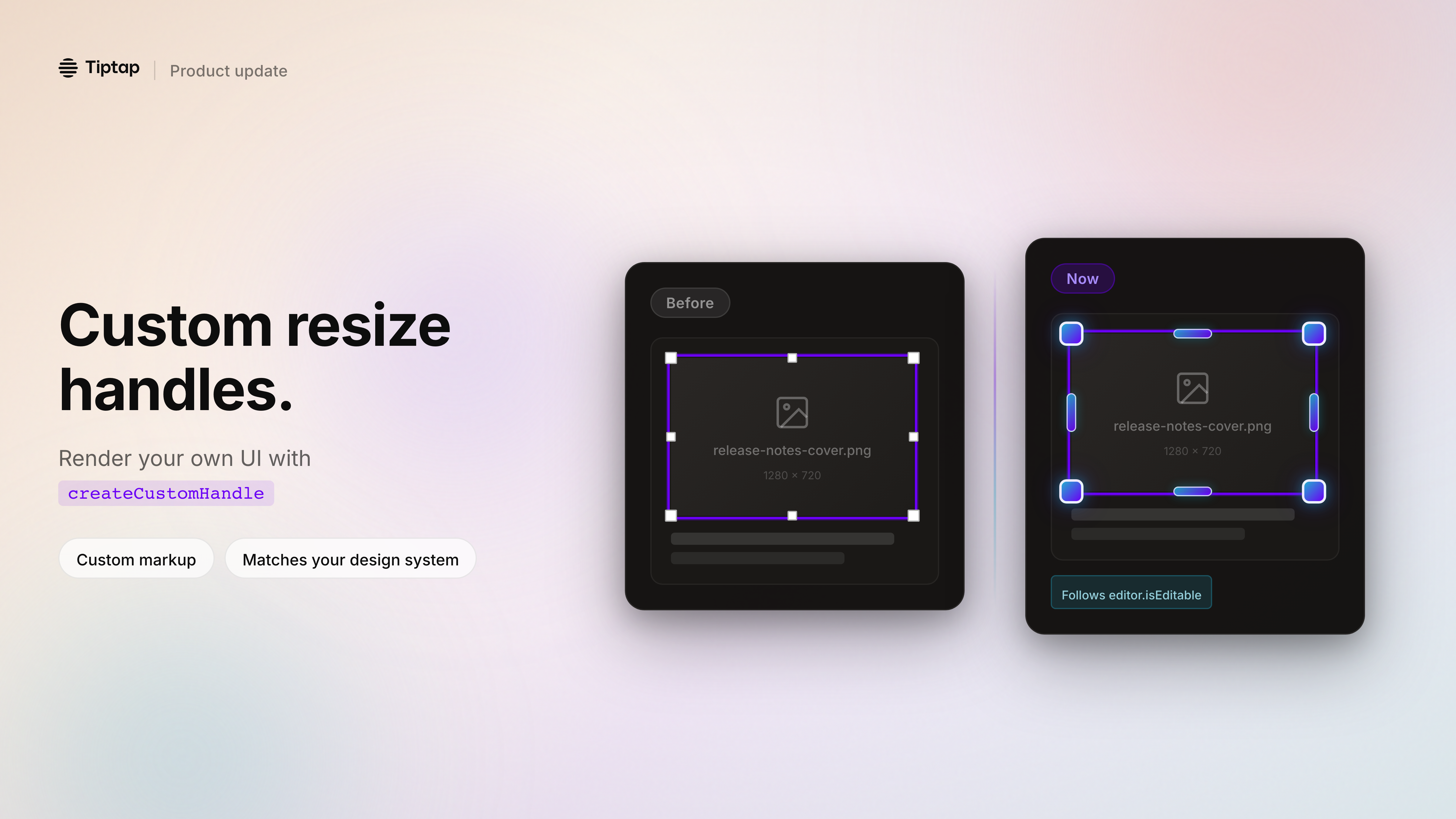
Build image resize handles that match your product UI.
If you've ever tried to ship a Notion-style editor, you know the pain: the core editing experience can look great… and then resize handles show up that don't match your design system.
Tiptap now lets you 𝗿𝗲𝗻𝗱𝗲𝗿 𝘆𝗼𝘂𝗿 𝗼𝘄𝗻 𝗿𝗲𝘀𝗶𝘇𝗲 𝗵𝗮𝗻𝗱𝗹𝗲𝘀 in `ResizableNodeView` via `createCustomHandle`.
What you get:
- 𝗙𝘂𝗹𝗹 𝗰𝗼𝗻𝘁𝗿𝗼𝗹 𝗼𝘃𝗲𝗿 𝗺𝗮𝗿𝗸𝘂𝗽 + 𝘀𝘁𝘆𝗹𝗶𝗻𝗴 for each handle direction
- Custom positioning (when you provide a custom handle, Tiptap won't apply the default positioning logic)
- Cleaner wrapper behavior (no more fighting inline styles with `!important`)
- Handles that 𝗮𝗽𝗽𝗲𝗮𝗿/𝗱𝗶𝘀𝗮𝗽𝗽𝗲𝗮𝗿 𝘄𝗶𝘁𝗵 `𝗲𝗱𝗶𝘁𝗼𝗿.𝗶𝘀𝗘𝗱𝗶𝘁𝗮𝗯𝗹𝗲`, so view mode stays clean
Use it for corner dots that match your components, larger touch targets on mobile, or richer UX like tooltips and overlays.
Docs / PR details are in the release notes. If you're customizing NodeViews today, this should remove a lot of glue code.
88 reactions
4 comments•1 repost

Medusa
77,350 followers
Now•
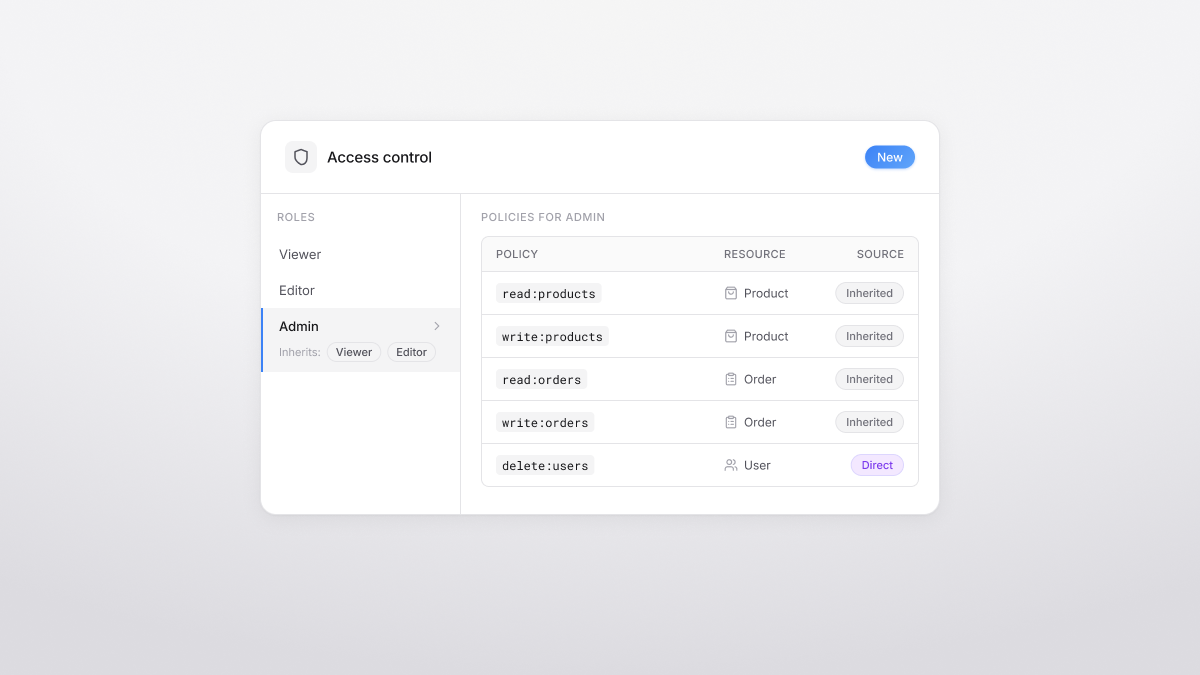
RBAC is now a first-class citizen in Medusa.
We've introduced a new Role-Based Access Control (RBAC) module so you can define 𝗿𝗼𝗹𝗲𝘀, attach 𝗴𝗿𝗮𝗻𝘂𝗹𝗮𝗿 𝗽𝗼𝗹𝗶𝗰𝗶𝗲𝘀 (resource + operation), and reuse permission sets via 𝗿𝗼𝗹𝗲 𝗶𝗻𝗵𝗲𝗿𝗶𝘁𝗮𝗻𝗰𝗲.
Why it matters:
- Give each team the access they need—without sharing admin superpowers
- Reduce duplication by building base roles (e.g., Viewer/Editor) and inheriting into higher roles (e.g., Admin)
- Manage roles and policies via new Admin API endpoints under `/admin/rbac/*`
This is the initial foundation—more to come as we expand access control across the platform.
Docs/PR: https://github.com/medusajs/medusa/pull/14310
88 reactions
4 comments•1 repost