
In 2025, the number of GitHub pull requests increased by 29%. In 2026, that number is almost guaranteed to keep climbing.
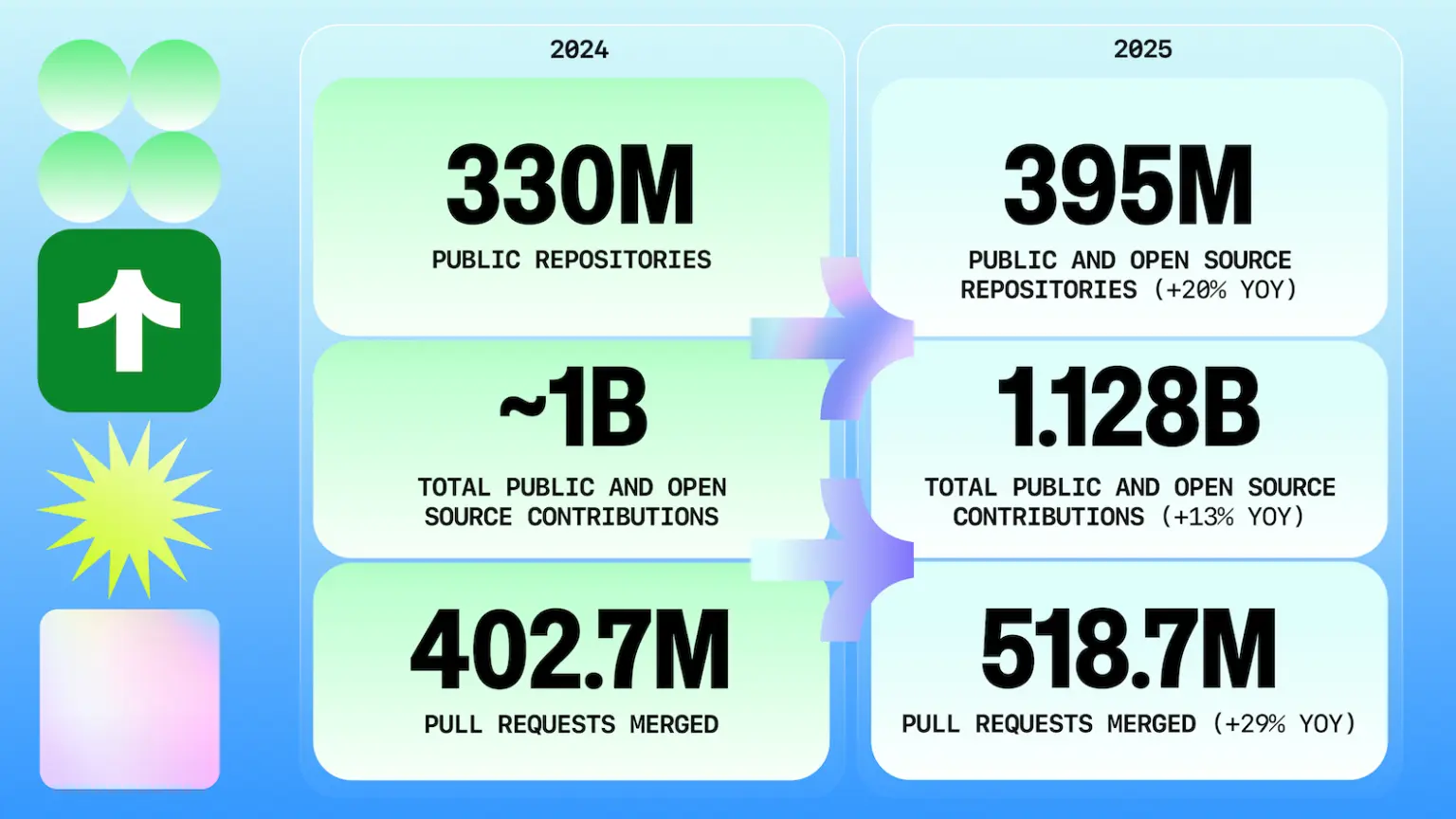
Source: GitHub Octoverse 2025
In at least one company I've spoken to, their product managers are being outpaced by the engineering team. They literally can't tell engineering what to build as quickly as engineering can build it. In another company, their PMs and designers are shipping features entirely on their own.
But when you're shipping this frequently, there just isn't enough time to tell your customers and prospects about all of it.
Why do teams try to build their own AI changelog generator?
When the volume of shipped features outpaces marketing's ability to keep up, the first instinct is always the same: “We already have structured data about what we're shipping. It's in our pull requests. Let's just pipe that through an LLM and auto-generate our changelog.”
It makes perfect sense. You've got commit messages, PR descriptions, maybe even conventional commit tags. Feed them to Claude or ChatGPT, get back a changelog entry.
Savvy engineering companies like Netlify, Vercel, and PlanetScale have all built out this workflow. And there are millions of weekly npm installs across tools that generate changelogs.
But look at what's actually being installed:
The vast majority of those downloads are release automation tools like semantic-release, changesets, and release-it, where the changelog is a side effect, not the point. The actual changelog generators (conventional-changelog, auto-changelog) are a fraction of the total.
The changelog has become an engineering artifact, not a marketing asset. It's a byproduct of your release pipeline that nobody outside of engineering ever sees.
What does AI-generated changelog content actually look like?
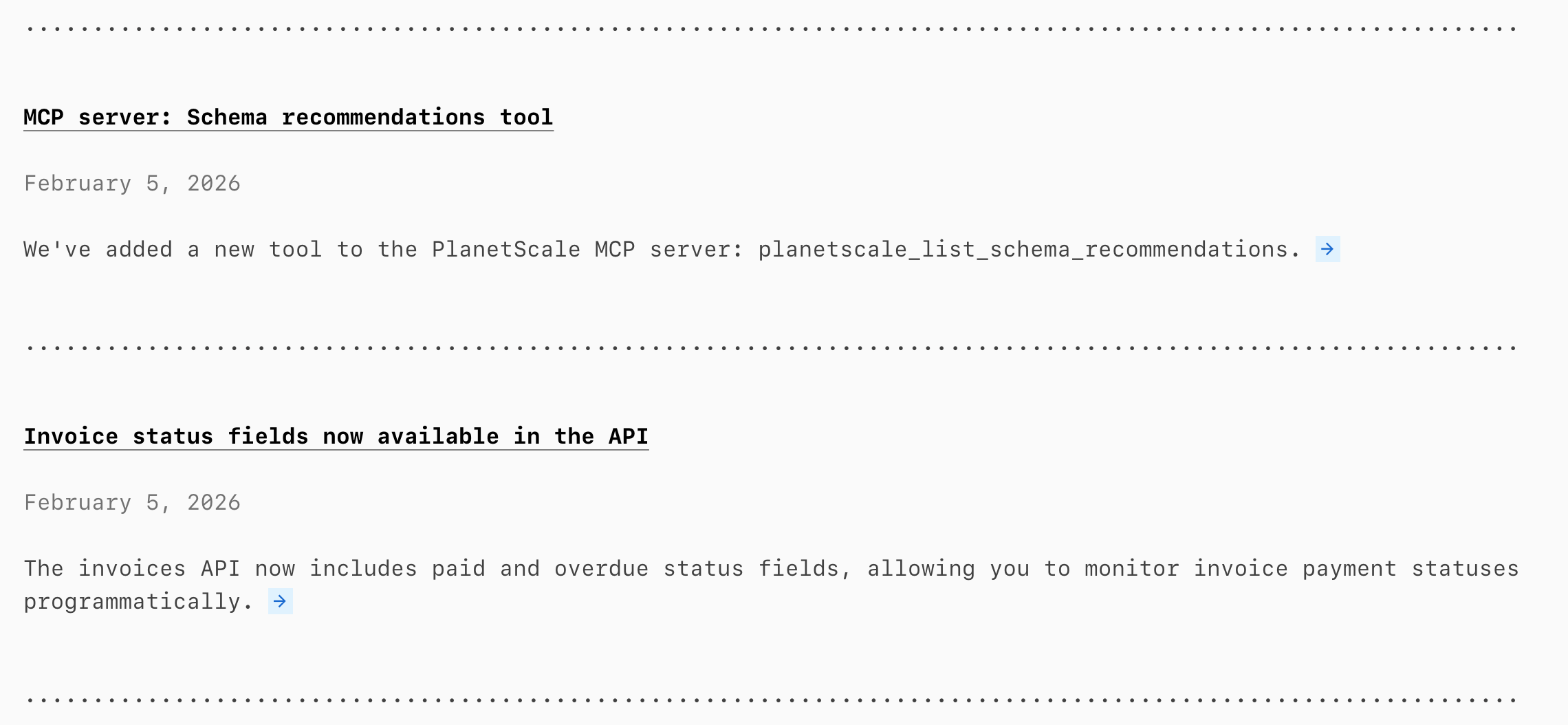
Here's what a typical AI-generated changelog entry looks like when it's pulling from commit history:
v2.4.1
- Updated authentication module for improved session handling
- Bumped react-router to v6.4
- Fixed edge case in webhook retry logic
- Improved query performance for dashboard endpoints
PlanetScale
Amplitude
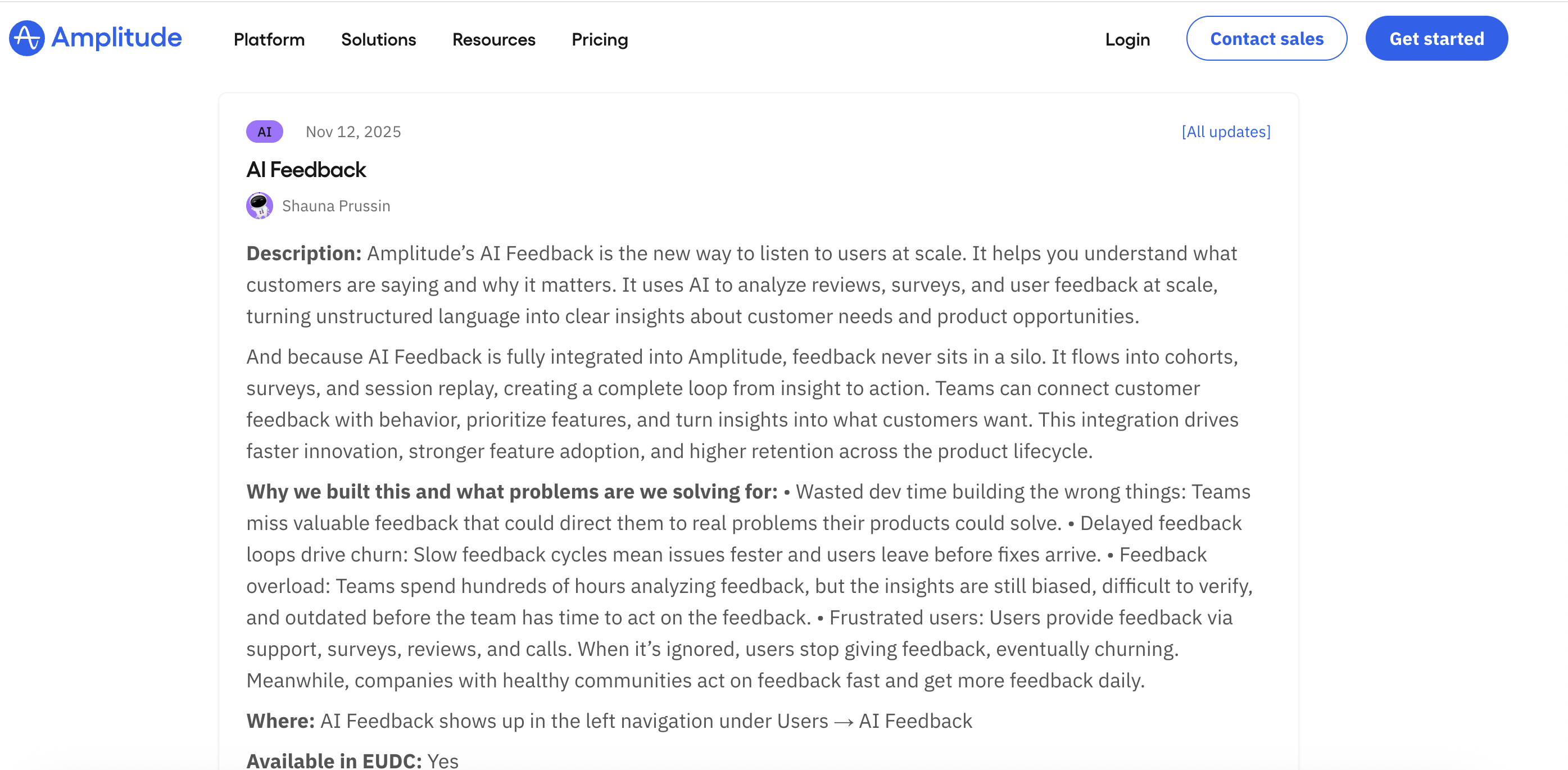
Technically accurate. But would you share either of these on LinkedIn?
The first instinct is “let's just tune the prompt.” And you'll certainly get better results. But that's not actually the core of the problem.
The 3 main problems with building your own changelog generator
I've talked to dozens of product, engineering, and marketing teams who've tried the automated changelog approach. Three problems keep coming up.
1. Your engineers get pulled off other things to maintain it
If you're Vercel and you have staff engineers hired specifically to create internal go-to-market tools, maintenance might not be a huge issue. But if you're literally any other company, your engineers probably have day jobs working on shipping (and fixing) the product you sell.
Every internal tool has a hidden cost, and AI pipelines are no exception. When Anthropic releases a new model, when OpenAI changes their API, when the market decides only high-quality motion graphics will do, when your prompt starts producing lower-quality output because your codebase structure shifted — someone has to notice, debug, update, test, and redeploy.
So what starts as “we automated our changelog” quietly becomes “someone on the engineering team spends hours a month babysitting a pipeline that no one fully trusts.”
Up to 75% of lifetime software cost happens after the initial build. Your “free” internal changelog tool has a full-time maintenance job hiding inside it.
2. Words alone can't tell the story
This is the one nobody talks about. There's a running joke that nobody reads changelogs, and honestly when your changelog is a wall of text that says “Redesigned dashboard for improved usability,” yeah, nobody's going to read that.
But show me a before-and-after screenshot of the new dashboard? I get it instantly. Show me a 5-second motion graphic showing the new SDK addition? I can immediately figure out if it makes sense for my codebase.
Linear gets this right
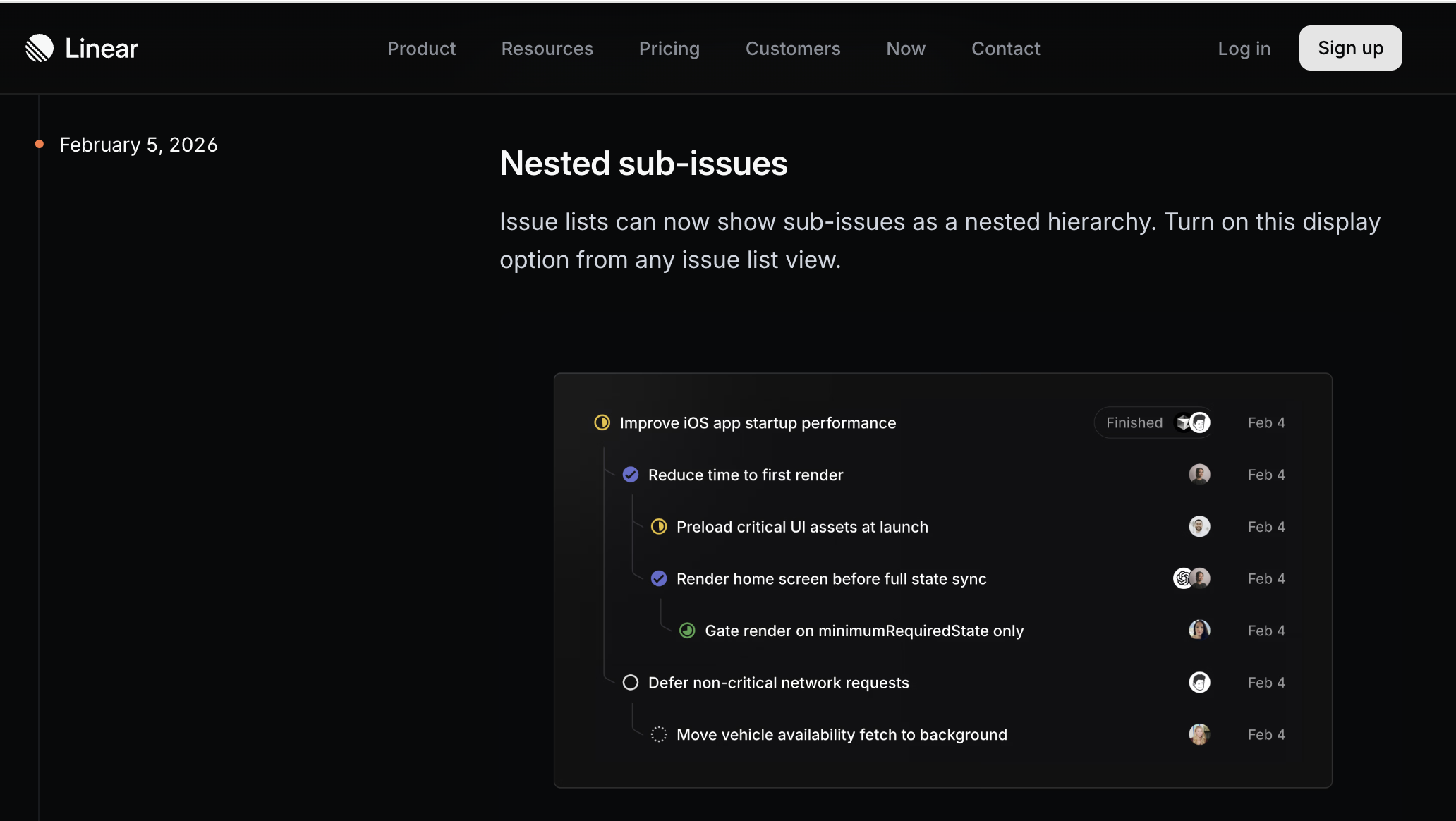
One glance and you understand the feature. No AI changelog generator produces this.
The best product updates are visual. Every AI changelog generator on the market today is text-only.
3. A changelog entry is only 10% of the work
Let's say your AI pipeline produces a decent changelog. Great. It lives on your /changelog page. Now what?
Your product newsletter needs a different angle. Your LinkedIn post needs a different tone. Your in-app notification needs to be shorter. Your sales team needs talking points for the enterprise accounts that have been requesting this exact feature.
Someone still has to take that changelog entry and rewrite it for every channel, every audience, every context. That “someone” is usually a product marketer who's already stretched thin and who could have written a better changelog entry in the first place if they'd had the bandwidth.
The automated changelog just moves the work downstream.
How does building your own compare to a dedicated tool?
Here's how the approaches stack up:
| Feature | DIY Changelog | PersonaBox |
|---|---|---|
| Input | Git commits, PR titles | Full PR context: description, code changes, linked issues |
| Output | Text-only changelog entries | Multi-channel content: LinkedIn, emails, blog drafts, tweets, changelog entries |
| Visuals | None | On-brand graphics generated for each update |
| Figma export | None | Full support with Auto Layout |
| Feature animations | None | 5-10 second animated clips for social media |
| Persona targeting | None. One version for everyone | Content tailored to specific buyer personas |
| Channel adaptation | Single format | Different tone and length per channel |
| Maintenance | Engineering team maintains prompt, pipeline, and API changes | Managed service. No pipeline to maintain |
| Time to publish | 30-60 min/feature (changelog + PMM rewrites) | 2-5 min/feature (review and approve) |
| Cost | AI tokens + hidden engineering hours | Free trial, then $49/mo |
How PersonaBox turns GitHub PRs into go-to-market content
PersonaBox is a tool that automatically converts GitHub pull requests into multi-channel marketing content for B2B SaaS teams. Just like the DIY approach, it generates changelog entries from your GitHub pull requests. But it doesn't stop there.
It generates on-brand visuals, animations, and Figma designs to go with every update. It creates channel-specific copy for Twitter, LinkedIn, your product newsletter, and your in-app feed. And everything is aligned not just to your brand guidelines, but to your tone for each channel and the personas you sell to.
Visuals
On-brand graphics and animations for every update
Multi-channel copy
Different tone and length for every platform
Persona-aligned
Tailored messaging for each buyer persona
When you bring those three things together — visuals, channel-specific copy, and persona-aligned messaging — you get significantly more out of every feature you ship.
No pipeline to maintain. No prompts to tune. No “last mile” editing that eats up your PMM team's week.
If you're shipping features faster than you can announce them, this is what PersonaBox was built for. Connect your GitHub repo, set up your personas and branding, and let your PRs announce themselves.
Don't take our word for it — see real examples
Browse product updates generated from actual GitHub PRs, complete with visuals, animations, and multi-channel copy for companies like Grafana, Supabase, and Cal.com.
View examples