
Your team merged 47 pull requests last month. How many did your customers actually hear about?
If you're like most B2B SaaS companies, the answer is somewhere between “a few” and “none.”
Not because the product updates weren't worth talking about, but because nobody had time to write the changelog entry, create the visuals, draft the LinkedIn post, adapt it for Twitter, send the newsletter, and brief the sales team.
The PersonaBox team spent years in Product Marketing at companies like Netlify and Builder.io, living this exact problem. Engineering shipped faster than marketing could tell customers about it. That experience is what led to PersonaBox. Full disclosure: PersonaBox is on this list (in the AI-powered generators section below), and one of the six other tools we cover may fit your team better. Every tool here has been used or evaluated firsthand.
The best changelog tool for your team depends on who's reading it: your engineering team, or your customers.
TL;DR
The best tools to automate changelog generation from pull requests in 2026 fall into three tiers. Free, developer-facing: Release Drafter, release-please, GitHub Changelog Generator, and GitHub's built-in Release Notes all generate markdown or GitHub Releases from PR titles and labels, which never reach customers. AI-written, customer-facing text: AutoChangelog uses AI to rewrite commits and hosts a basic branded changelog page; GitSaga generates AI markdown on-demand. AI-written, customer-facing, with branded visuals and a hosted page: PersonaBox is the only tool that publishes a fully themable hosted changelog at yourname.personabox.page (or your own domain), with branded screenshots generated by importing real components from your codebase, plus built-in email subscribers, tags, and drag-and-drop ordering. Optional: social, blog, and team advocacy from every PR. All seven are compared below.
Why changelog automation matters now
Shipping velocity has outpaced communication capacity at most software companies. In 2025, GitHub reported a 29% year-over-year increase in pull requests. With AI-assisted coding accelerating that pace even further, the gap between what gets built and what gets announced is continuing to widen.
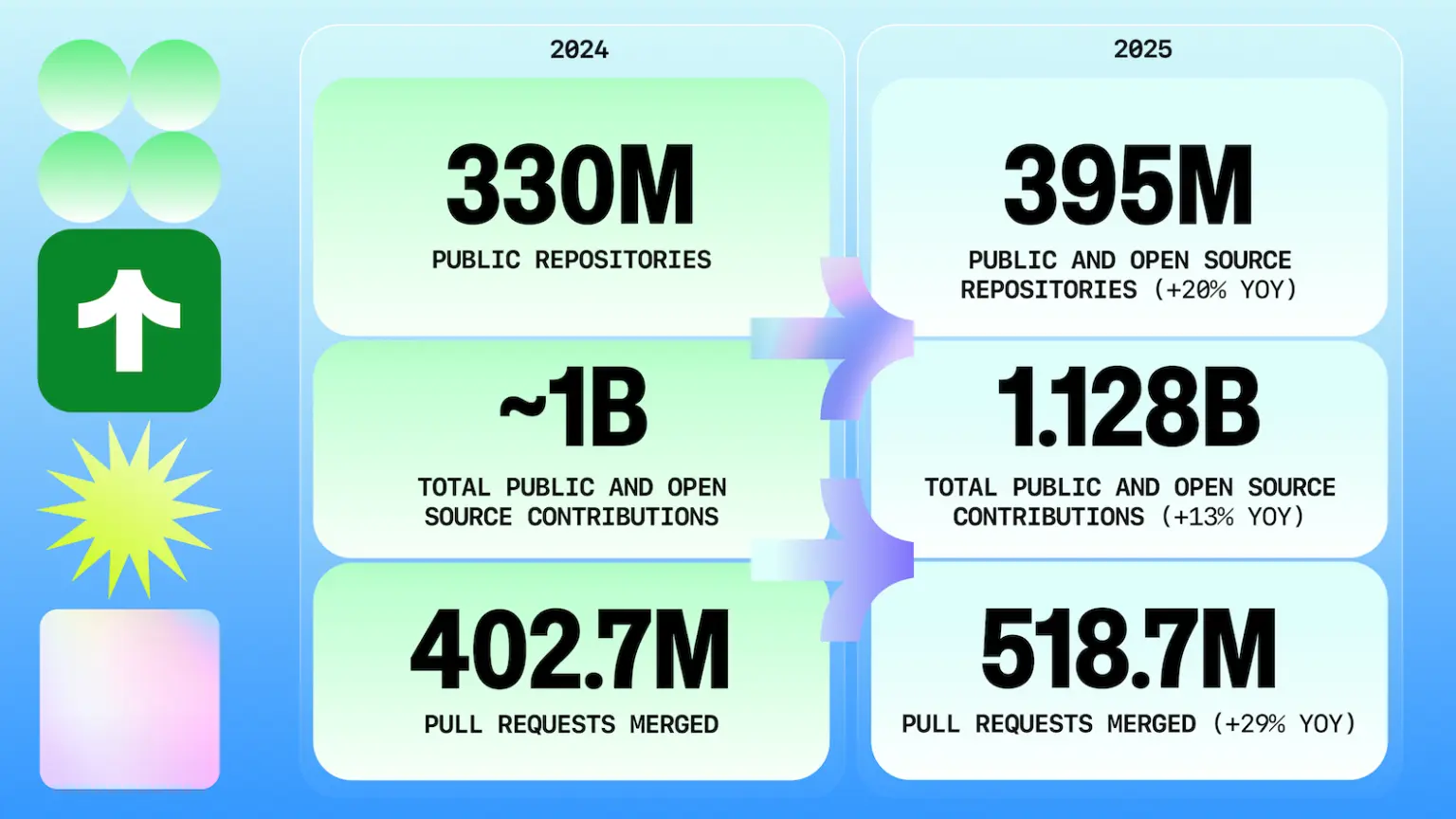
Source: GitHub Octoverse 2025
Changelogs serve three audiences that most teams don't think about separately: existing customers who need to know what's new (retention), prospects who evaluate your shipping velocity as a buying signal (acquisition), and your internal team (i.e., customer success, sales engineering, etc.) who need to know what went out the door. When none of those audiences hear about your work, you're leaving significant business value on the table.
The good news: there are more tools than ever to automate changelog generation from pull requests. Some generate a CHANGELOG.md file that lives in your repo. Others use AI to produce customer-friendly summaries. And one category goes all the way to generating full marketing content from your PRs.
Here's a breakdown of all of them.
How we evaluated these tools
Every tool on this list generates changelog content from GitHub pull requests. Beyond that, each one was evaluated across six dimensions that matter for different team contexts.
Input source
PR titles, labels, commits, or full PR context
Output format
CHANGELOG.md, GitHub release, hosted page, or multi-channel
AI involvement
None, AI summarization, or full AI content generation
Setup complexity
One-click, GitHub Action YAML, or CLI configuration
Price
Free, pay-per-use, or monthly subscription
Best for
Which team profile and workflow fits each tool
AI-powered generators
These tools use AI to go beyond formatting PR titles. They analyze code changes, PR descriptions, and repository context to generate changelog content that reads like a human wrote it. Output ranges from customer-friendly text summaries (AutoChangelog, GitSaga) to fully hosted, branded pages with real-product visuals (PersonaBox).
1. AutoChangelog
AutoChangelog connects to your GitHub repo via webhook and uses AI to generate natural language changelog entries from PRs and commits. Instead of bullet points that say “refactored auth module,” it produces entries like “Improved login reliability with faster session handling.” It offers a review mode so you can approve entries before they go live, and hosts the changelog on a branded page for you.
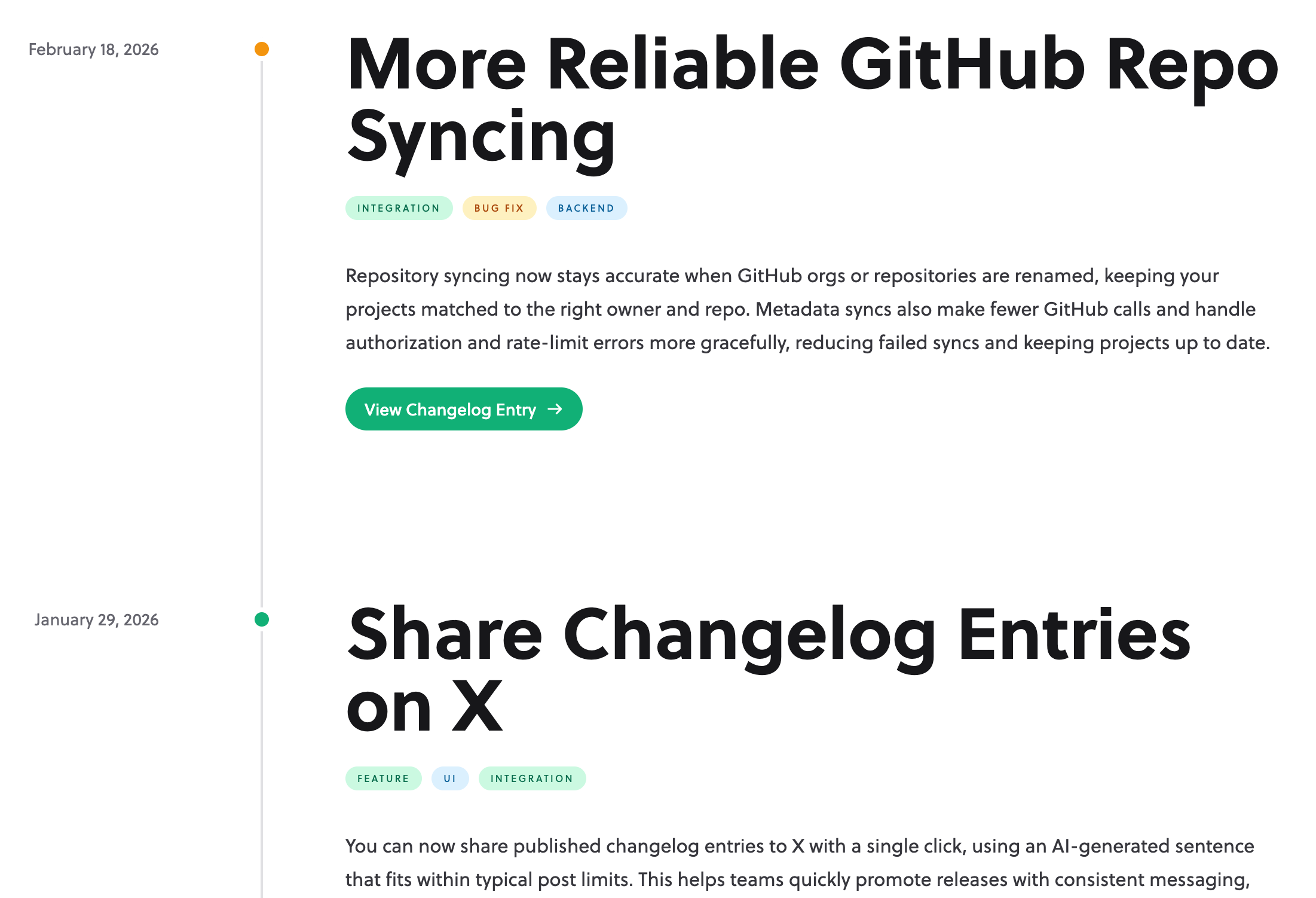
Understands code context, not just PR titles. Customer-readable output. Hosted changelog page included. Low-effort webhook setup.
Single-format output (hosted changelog page, no product visuals). No multi-channel adaptation. No social copy or team posts. Quality depends on PR description quality.
Best for: Teams who want customer-readable changelogs without building their own AI pipeline.
2. PersonaBox
Full disclosure: this is our tool. PersonaBox is a fully hosted, themable changelog product. Entries publish to yourname.personabox.page (or a custom domain). Theme is fully customizable: light or dark, brand colors and fonts, hero with optional banner image, logo, social and docs links, drag-and-drop entry ordering, default and custom tags (New, Improved, Fix, API, Breaking, Beta, plus your own), markdown body with embedded YouTube/Loom videos, draft/publish toggle per entry, secure preview links for stakeholders, and a built-in email subscribe form with subscriber management.
What makes PersonaBox qualitatively different from everything else in this category is the visual. PersonaBox clones your repo, finds the page in the PR diff that implements the feature, reads your Tailwind config and global styles, imports the actual components into a sandbox, and renders them at 4× resolution. Copy is generated against your brand voice, persona messaging, and channel guidelines, then run through a rules engine that enforces your style guide before saving. Generation is natively multilingual.
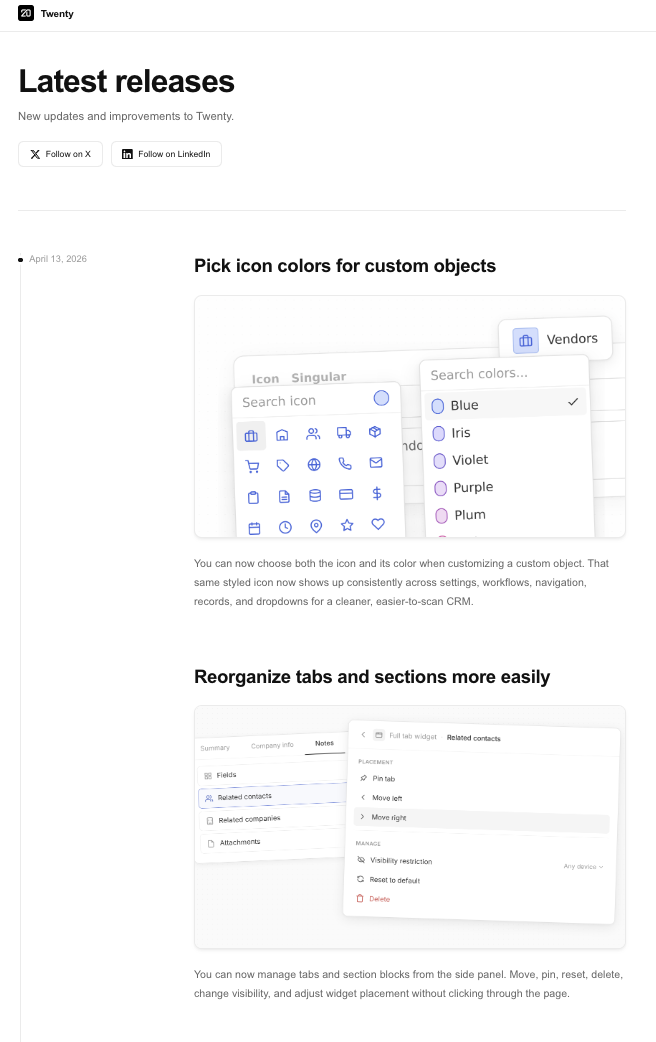
Optional add-ons cover the rest of the GTM motion from the same merged PR: matching LinkedIn / Twitter / newsletter copy, animated feature videos, full blog drafts, personalized team advocacy posts in each team member's voice, and Figma export. Use as much or as little as you need. An intelligent PR filter automatically skips bug fixes, chores, and docs-only changes so only real features draft into entries.
Fully hosted, themable changelog page on a custom subdomain or your own domain. Built-in email subscribers and tags. Only tool here with visuals generated from your real codebase components, not generic AI imagery. Brand- and persona-aware copy with rules-engine enforcement. Native multi-language. Optional multi-channel content (LinkedIn, Twitter, newsletter, animations, blog, team advocacy, Figma export) from the same PR.
Paid product (free trial, then $49/mo). Overkill if you only need a developer-facing CHANGELOG.md and don't care about customer-facing presentation. Best fit is B2B SaaS with active GitHub repos shipping at least monthly.
Best for: Teams who want a fully hosted, branded customer-facing changelog with real-product screenshots and audience-aware copy, without hiring designers and writers to do it manually. Optional GTM features if you need them.
3. GitSaga
GitSaga is an AI-powered changelog generator that uses Claude to analyze your GitHub commits and PRs. You point it at a repo, select a date range, and it generates a structured changelog with multiple format options (standard, conventional, feature digest). It also suggests version numbers and generates stats about the release.
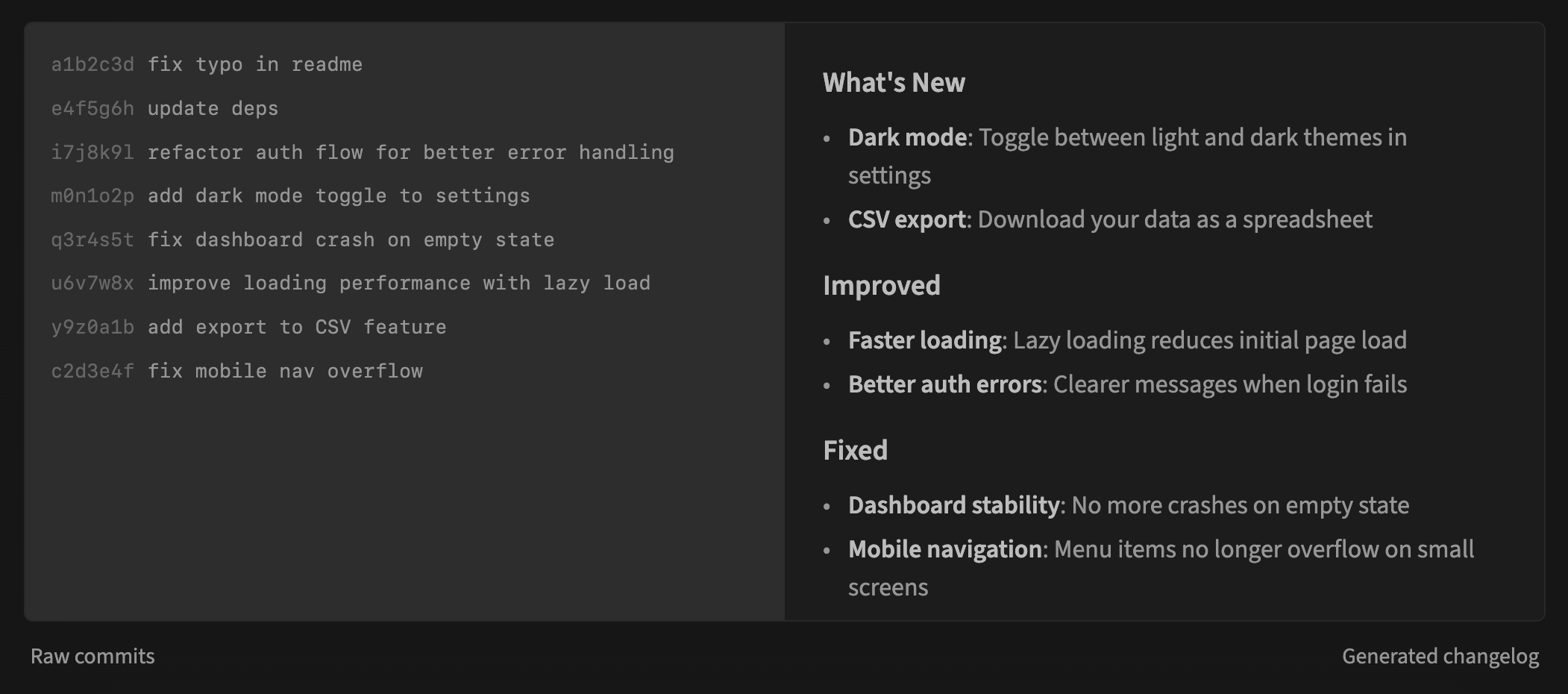
The pay-per-use pricing model (roughly $0.05 per changelog) makes it accessible for teams that only need occasional changelog generation. You can share changelogs via public links or download the markdown. It's a newer tool, so it doesn't have the adoption of the CI/CD tools yet, but the AI-generated output is notably more readable.
AI-powered with Claude. Multiple output formats. Version suggestion. Shareable public links. Low cost per changelog (~$0.05). No login required.
Manually triggered (not automated via webhook). Text-only output (no visuals, no multi-channel). Newer tool with less track record. No hosted changelog page.
Best for: Teams who want quick, AI-generated changelogs on demand without committing to a subscription.
CI/CD and developer tools
These tools live in your CI/CD pipeline or GitHub Actions workflow. They're free, open-source, and generate changelogs as part of your release process. The output is typically a CHANGELOG.md file or a GitHub Release draft, which means it's useful for your engineering team but rarely reaches customers or prospects directly.
4. Release Drafter
A GitHub Action that automatically drafts release notes as PRs get merged. You define categories in a YAML file (features, bug fixes, maintenance), map them to PR labels, and Release Drafter organizes your draft accordingly. When you're ready to ship, you review the draft and hit publish.
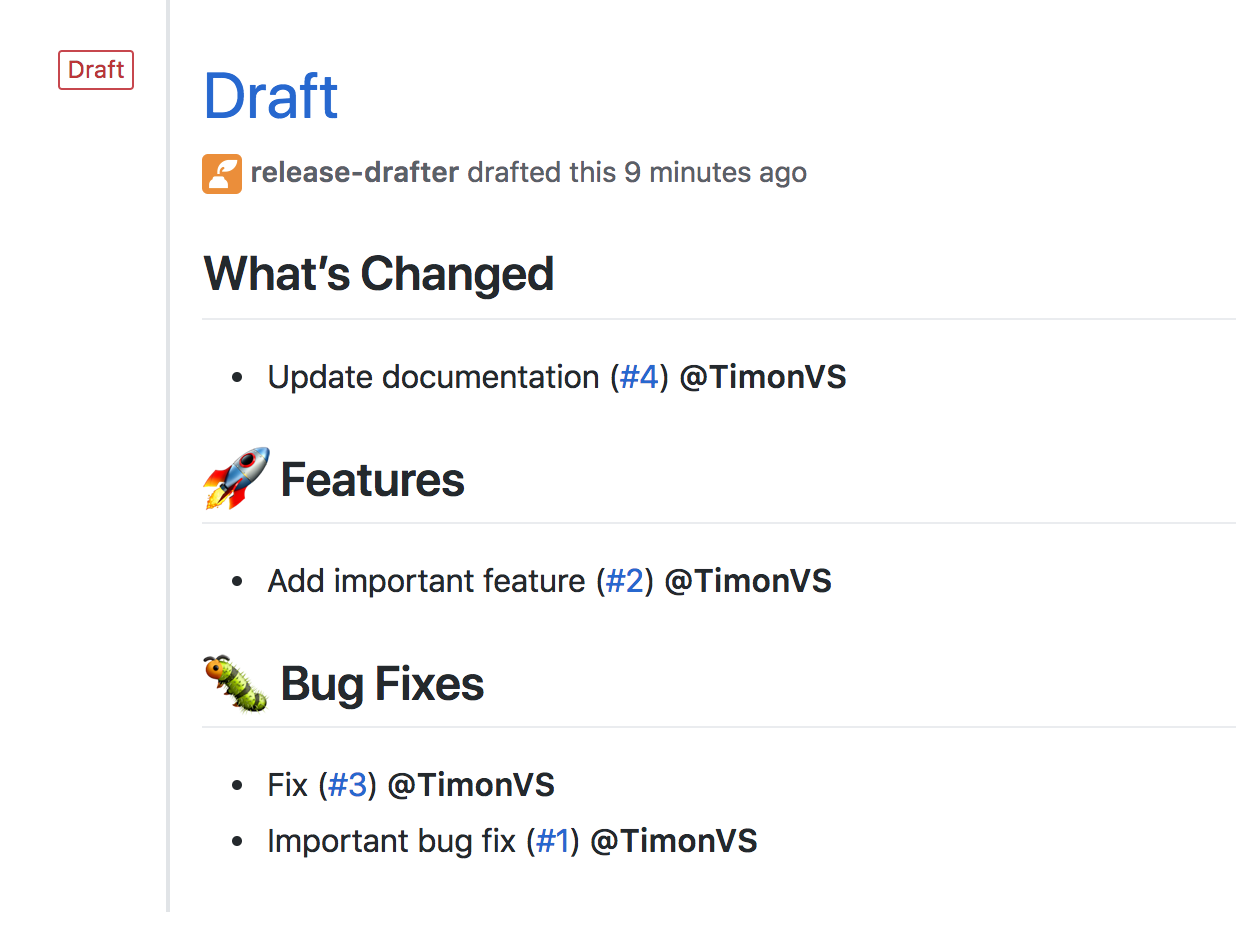
It's elegant in its simplicity. No external services, no API tokens beyond GitHub, and the label-based categorization feels natural if your team already labels PRs. The downside is that it's only as good as your PR titles. If your team writes “fix stuff” as PR titles, your release notes will say “fix stuff.”
Zero external dependencies. Free. Runs inside GitHub Actions. Intuitive label-based categorization. Thousands of GitHub stars.
Output is raw PR titles (no rewriting or summarization). Requires disciplined PR labeling. Lives on GitHub Releases only. Manual publish step.
Best for: Teams already using GitHub Releases who want organized draft notes without leaving GitHub.
5. release-please
From Google's googleapis org, release-please automates semantic versioning and changelog generation. It parses your git history for conventional commit messages (feat:, fix:, etc.) and automatically opens a “release PR” that includes version bumps and a generated CHANGELOG.md. When you merge that release PR, it tags the commit and creates a GitHub Release.
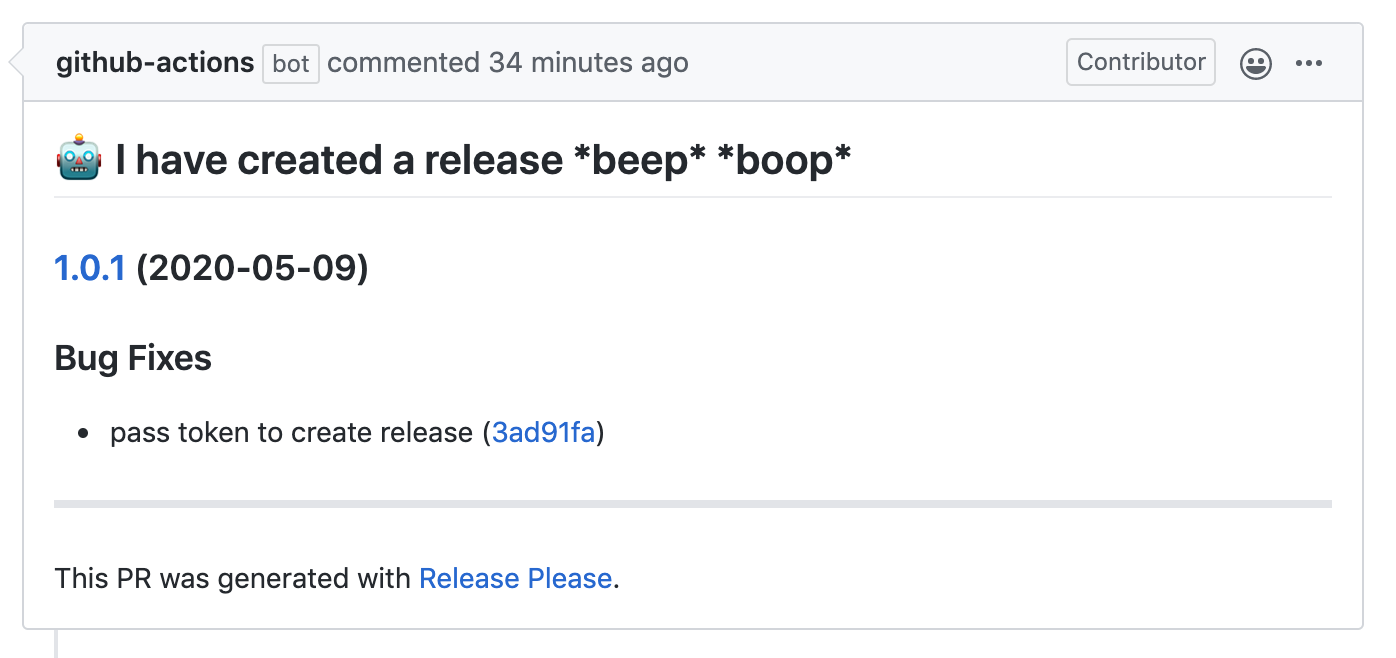
The key difference from Release Drafter is that release-please handles versioning too. It reads your commit messages to determine whether the next release is a patch, minor, or major bump. It supports over 20 language strategies (Node, Python, Java, Rust, Go, and more) and monorepos via manifest configuration. The trade-off is that it requires your team to follow conventional commit conventions consistently.
Handles versioning and changelog together. Supports 20+ language strategies and monorepos. Creates release PRs you can review before publishing.
Requires conventional commit discipline. Reads commit messages rather than PR descriptions. Output is developer-facing (CHANGELOG.md + GitHub Release).
Best for: Teams who want automated semantic versioning with a changelog as part of the release pipeline.
6. GitHub Changelog Generator
A Ruby-based CLI tool that queries the GitHub API directly to build changelogs from your merged PRs, closed issues, and labels. Unlike the previous two tools, it reads actual PR metadata from GitHub (titles, labels, authors) rather than parsing commit messages. You run it locally or in CI, and it generates a CHANGELOG.md with links back to every PR and issue.
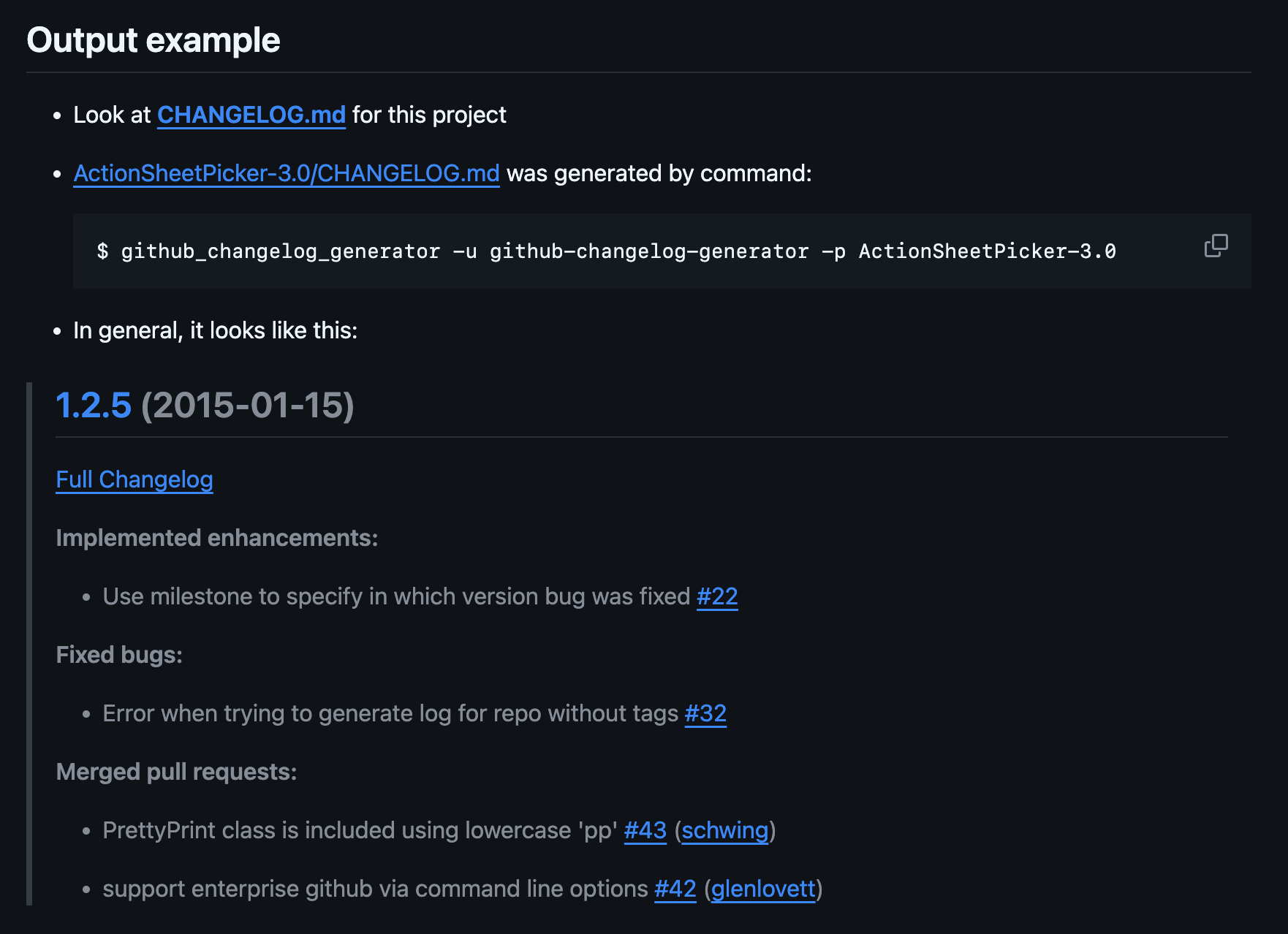
With 7.5K+ GitHub stars, it's the most popular dedicated changelog generator in open source. The label-based categorization is flexible (you can map any label to any section), and the output is well-formatted with hyperlinks. Since it's Ruby-based, non-Ruby teams typically run it via Docker or a GitHub Action wrapper.
Reads PR metadata directly from GitHub API. Flexible label-to-section mapping. Most popular open-source changelog generator (7.5K+ stars). Includes PR and issue links in output.
Ruby dependency (Docker available). Output is still a text-based CHANGELOG.md. No AI summarization. Requires manual trigger or CI integration.
Best for: Teams who want detailed, well-linked changelogs built directly from PR and issue data.
7. GitHub's built-in “Generate Release Notes”
You might not even know this exists. When creating a new release on GitHub, there's a “Generate release notes” button that auto-populates the description with a list of PRs merged since the last tag. It groups them by label, credits first-time contributors, and produces a readable summary.
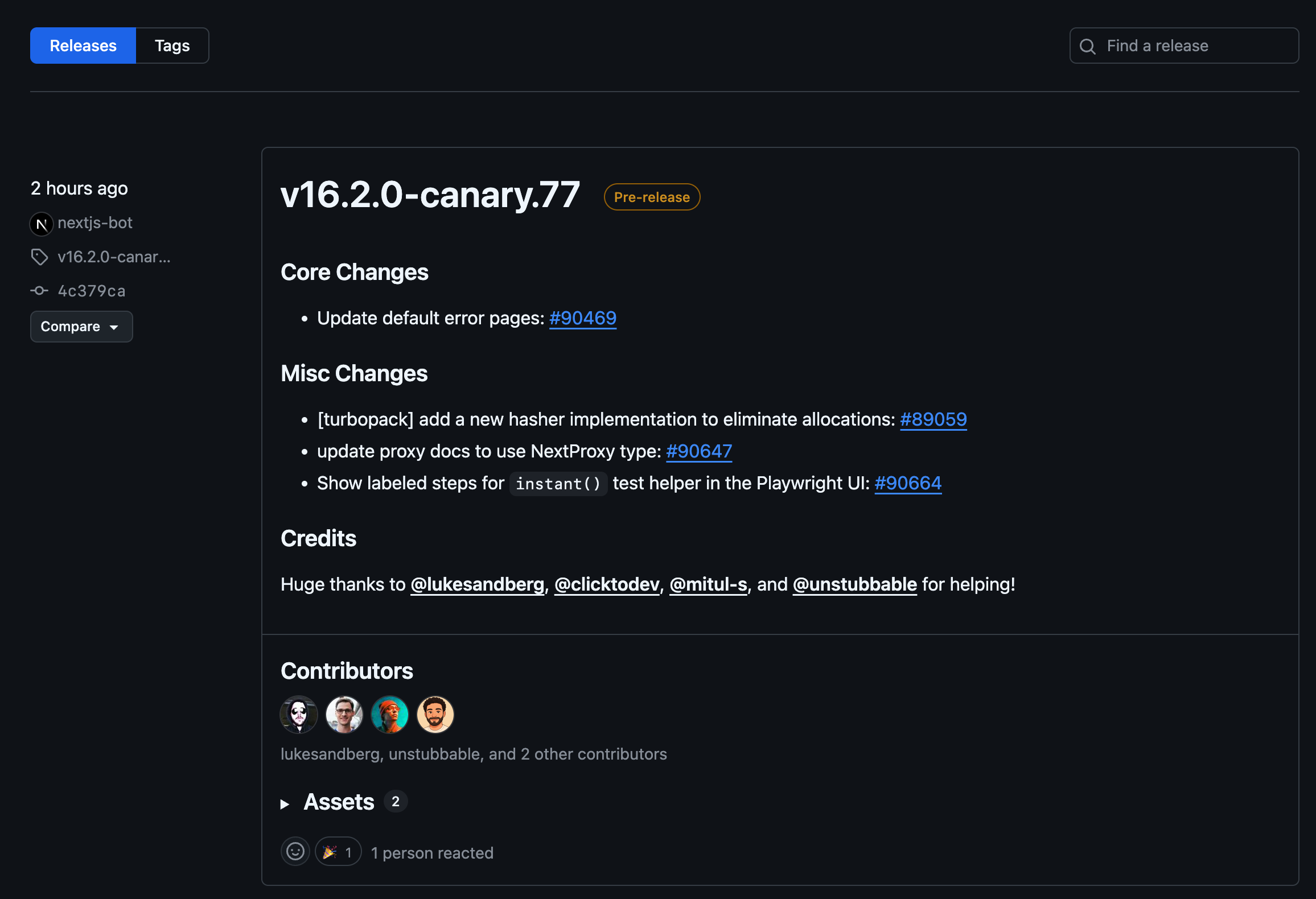
For zero setup, it's surprisingly useful. The output is essentially a formatted list of PR titles grouped by label, which is better than nothing. But it's not rewriting anything for you. If your PR title was “WIP: fix thing,” that's what shows up in your release notes.
Literally zero setup. Built into GitHub. Free. Recognizes first-time contributors (nice touch for open source).
Output is formatted PR titles with no summarization. No customization beyond label mapping. Only lives on the GitHub Releases page.
Best for: Teams who want something better than nothing with literally zero effort.
Every tool in this category is free and generates changelog content from PR data. But the output stays within your GitHub ecosystem: a CHANGELOG.md or a Releases page that your customers and prospects are unlikely to visit.
Side-by-side comparison
Here's how all 7 tools stack up. Scroll right on mobile to see all columns.
| Tool | Hosted page | Visuals | Input | Output | AI | Price | Best For |
|---|---|---|---|---|---|---|---|
| Release Drafter | No (GitHub only) | No | PR titles + labels | GitHub release draft | No | Free | Teams using GitHub Releases |
| release-please | No (GitHub only) | No | Conventional commit history | CHANGELOG.md + GitHub release | No | Free | Semantic versioning pipelines |
| GitHub Changelog Generator | No | No | Merged PRs + issues + labels | CHANGELOG.md with PR links | No | Free | Detailed PR-based changelogs |
| GitHub Release Notes | No (GitHub only) | No | Merged PRs | Release notes page | No | Free | Zero-effort minimum |
| AutoChangelog | Yes (basic) | No | PRs + commits (webhook) | Hosted changelog page | Yes | Freemium | Customer-readable changelogs |
| GitSaga | No | No | Commits + PRs | Markdown + shareable links | Yes (Claude) | Pay-per-use (~$0.05) | Quick AI-generated changelogs |
| PersonaBox | Yes (themable) | Yes (from your real codebase) | GitHub PRs + commits (webhook) | Hosted changelog page, optional multi-channel content | Yes (16-tool pipeline) | Free trial, $49/mo | Branded customer-facing changelogs with real-product visuals |
Two things to notice. First, only two tools host a customer-facing changelog page: AutoChangelog (basic) and PersonaBox (themable, with subscribers, tags, drag-and-drop, and custom domains). Everything else lives inside GitHub or in a markdown file your customers will never see. Second, only PersonaBox generates visuals, and they're not generic AI imagery. They're screenshots of your real product.
So: if a CHANGELOG.md for engineering is genuinely all you need, any of the four CI/CD tools will work for free. If you want a basic customer-facing page with AI-written copy, AutoChangelog. If you want a fully branded customer-facing changelog with real-product screenshots and audience-aware copy, and you don't want to staff designers and writers to build it, that's where PersonaBox sits. The multi-channel content (social, blog, team advocacy) is optional, layered on top.
How to choose the right tool
Start with your goal, not the tool. Here are three common starting points and where they lead:
"I need a CHANGELOG.md or GitHub Release notes for engineering"
Use
Release Drafter (label-based), release-please (semantic versioning), or GitHub Changelog Generator (PR metadata)
Cost
Free
Trade-off
Text-only output that lives in GitHub and rarely reaches anyone outside engineering.
"I want a basic AI-written, customer-readable changelog page"
Use
AutoChangelog (automated via webhook) or GitSaga (on-demand markdown)
Cost
Free to low
Trade-off
Limited theming. No visuals. No subscriber management. Single-channel.
"I want a fully branded customer-facing changelog with real-product visuals"
Use
PersonaBox: hosted page on a custom subdomain or domain, themable, real-component screenshots, email subscribers, optional multi-channel content
Cost
Free trial, then $49/mo
Trade-off
Overkill if you only need a developer-facing CHANGELOG.md.
Why a changelog is only the beginning
Here's the uncomfortable truth about product marketing: a changelog entry is about 10% of the work. The other 90% is adapting that entry for LinkedIn, rewriting it for Twitter, creating a visual that makes someone stop scrolling, drafting a newsletter blurb, writing talking points for the sales team, and getting your team members to post about it in their own voice.
The companies that do this exceptionally well, like Linear, Vercel, and Supabase, have dedicated teams producing this content. Linear's changelog is a marketing channel, not an engineering artifact. Every entry has a branded visual, a clear narrative angle, and a tone that matches their brand perfectly. But they have full-time designers and writers making that happen.
Most B2B SaaS teams don't have that luxury. They have one product marketer (or zero) trying to keep up with an engineering team that ships daily. And that marketer is already stretched across positioning, competitive analysis, sales enablement, and campaign work.
Studies consistently show employee posts get significantly more engagement (5-8x by some measures) than company page posts on LinkedIn. But asking your team to write individual posts for every feature is unrealistic unless someone writes those posts for them. This is why team advocacy automation, generating personalized posts in each team member's voice, is the most underrated feature in this entire category.
Your product ships faster than your story does. The best tool isn't the one that generates the best changelog. It's the one that closes the gap between shipping and storytelling.
How to get started with PersonaBox
If you've read this far and you're thinking “okay, show me,” here's the five-step version:
Connect your GitHub repo and pick your subdomain
One-click GitHub integration, plus pick a subdomain. Your changelog goes live at yourname.personabox.page (custom domain optional). Theme it light or dark, set your brand colors, fonts, hero, logo, and social links.
Set up your brand context
Add your personas, brand voice, channel guidelines, and writing rules. This takes about 10 minutes and only needs to be done once. The system uses this on every entry it generates afterward.
PersonaBox filters and drafts entries automatically
When a PR merges, the AI pipeline evaluates whether it's customer-facing. Bug fixes, chores, and docs-only changes are automatically skipped. Features get a draft entry ready for review: branded visual built from your real codebase components, customer-readable title and body, and suggested tags.
Review and toggle publish
In the dashboard you can edit the title, summary, body, image, and tags inline; reorder entries with drag-and-drop; or pull in additional images from your content library. Hit the publish toggle and the entry goes live on your changelog page.
Visitors read it. Subscribers get notified.
Your customers, prospects, and team see a fully branded changelog page. Visitors can subscribe via the built-in email form. Optionally, the same PR also produces matching LinkedIn, Twitter, newsletter, blog, and personalized team advocacy posts. Copy them out, post them anywhere, or hand visuals to designers via Figma export.
Don't take our word for it. See real examples
Browse product updates generated from actual GitHub PRs, complete with visuals, animations, and multi-channel copy for companies like Grafana, Supabase, and Cal.com.
View examples